Replacing professional photo shoots with a 3-minute 3D scan
A mobile-first SaaS platform designed around non-technical users, validated with 10 restaurant owners.
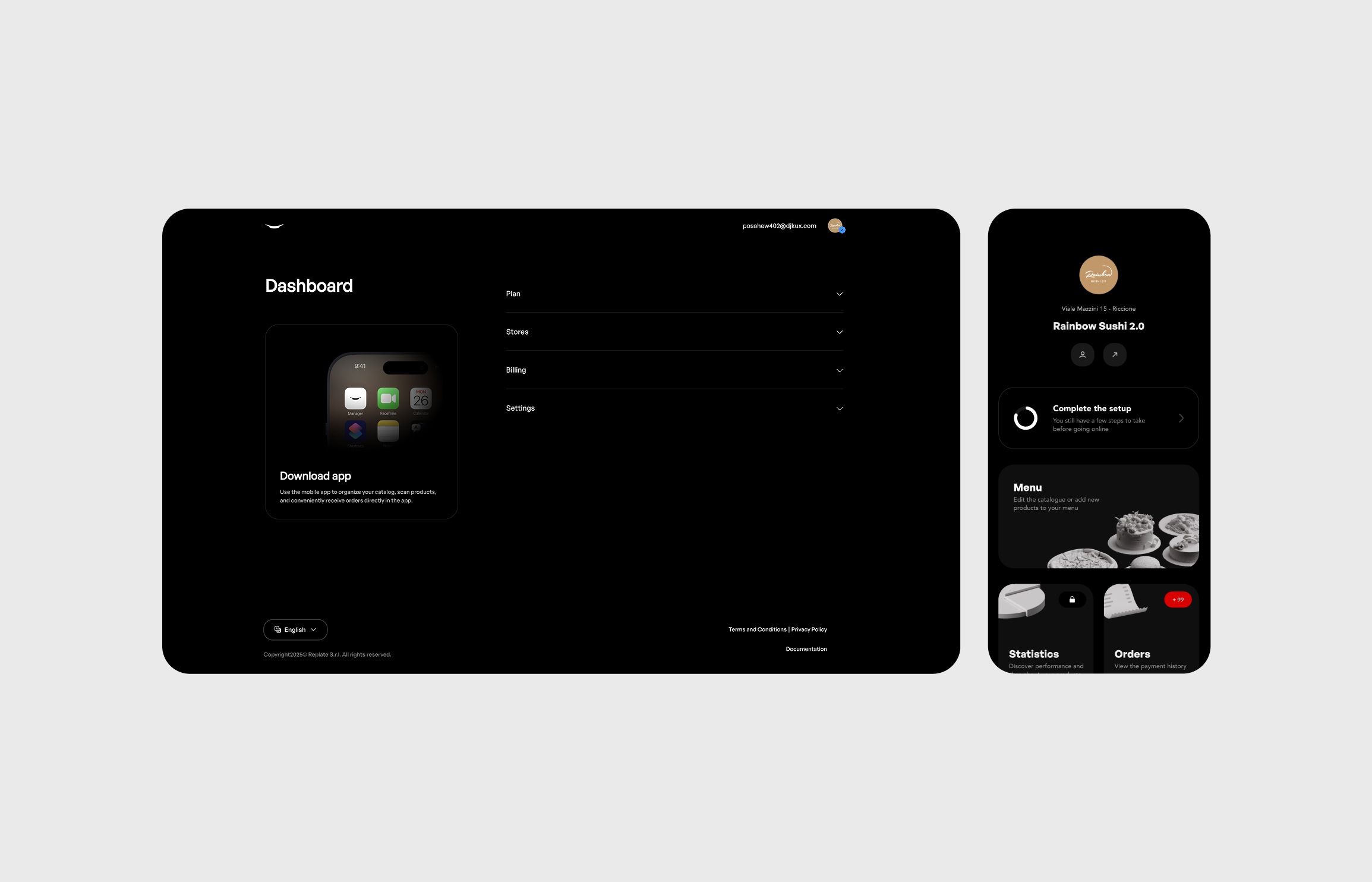
At-A-Glance
Replate is a web and mobile SaaS platform that lets restaurants create and manage interactive 3D food scans. It streamlines the costly process of food presentation by allowing managers to instantly publish high-quality, interactive previews across websites, apps, delivery platforms, and in-store displays.
Starting thoughts...
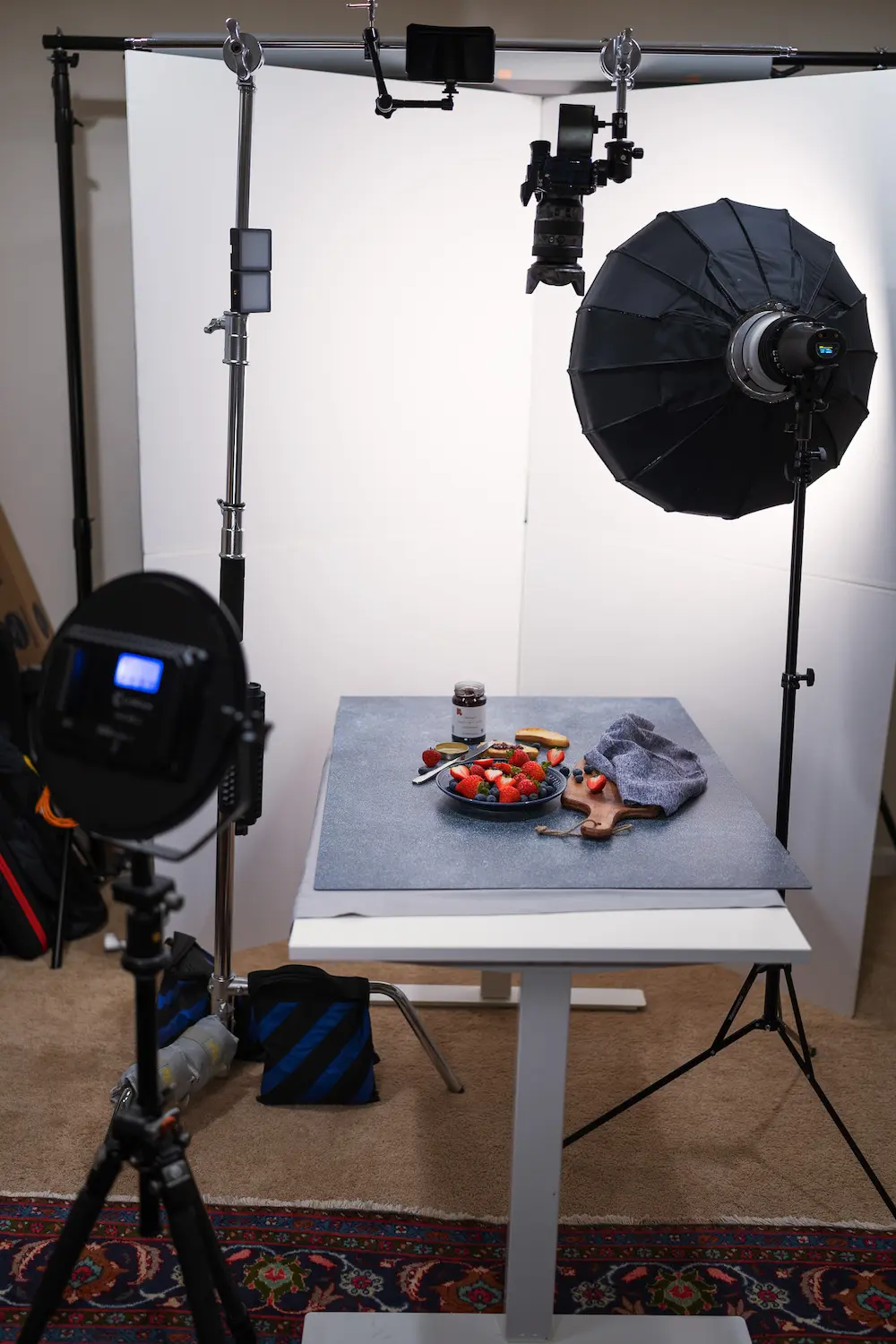
Restaurants still rely on professional photo services
- Is expensive to update when menus change.
- Can’t easily sync between web, app, and in-store displays.
Solution
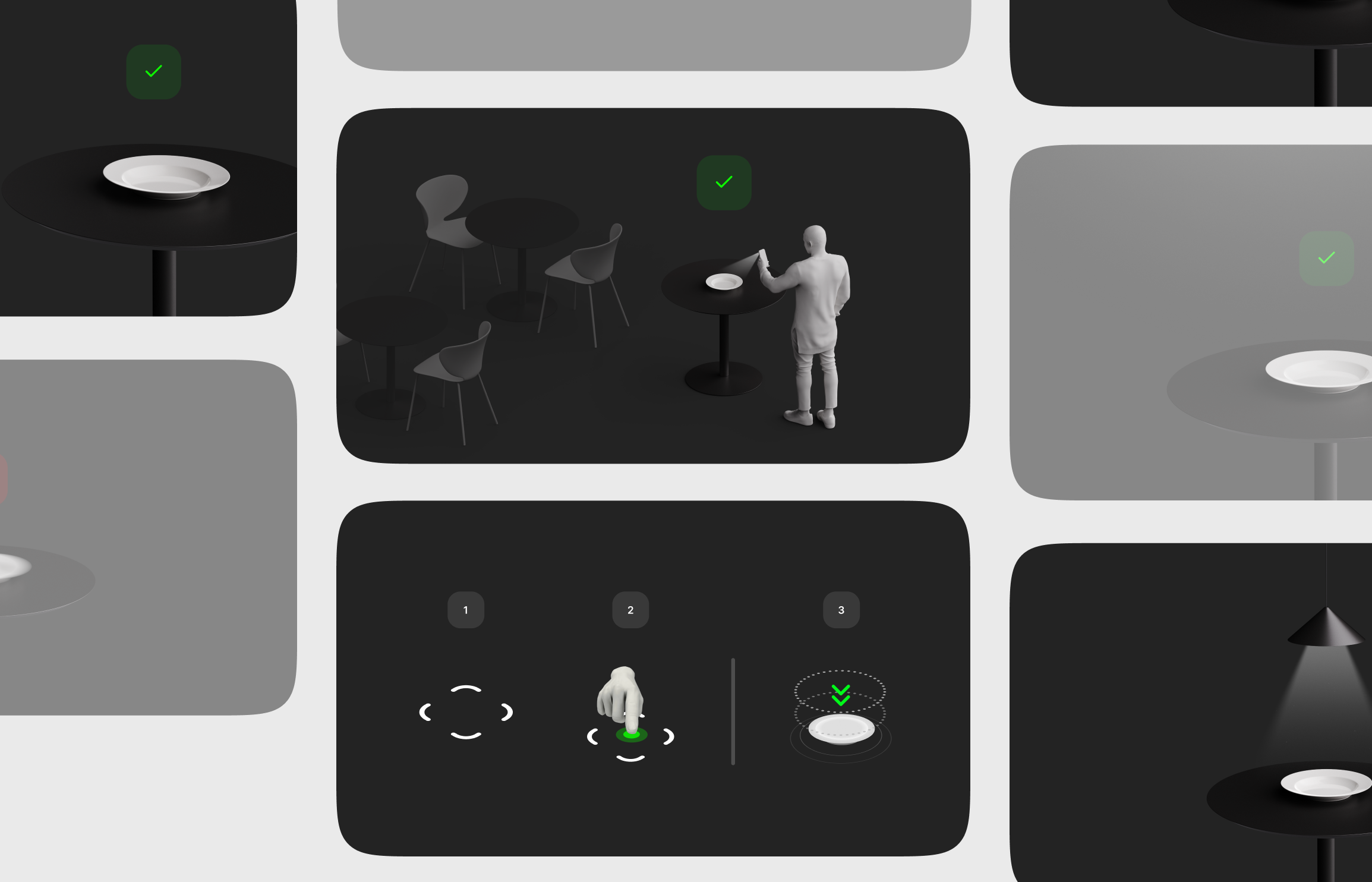
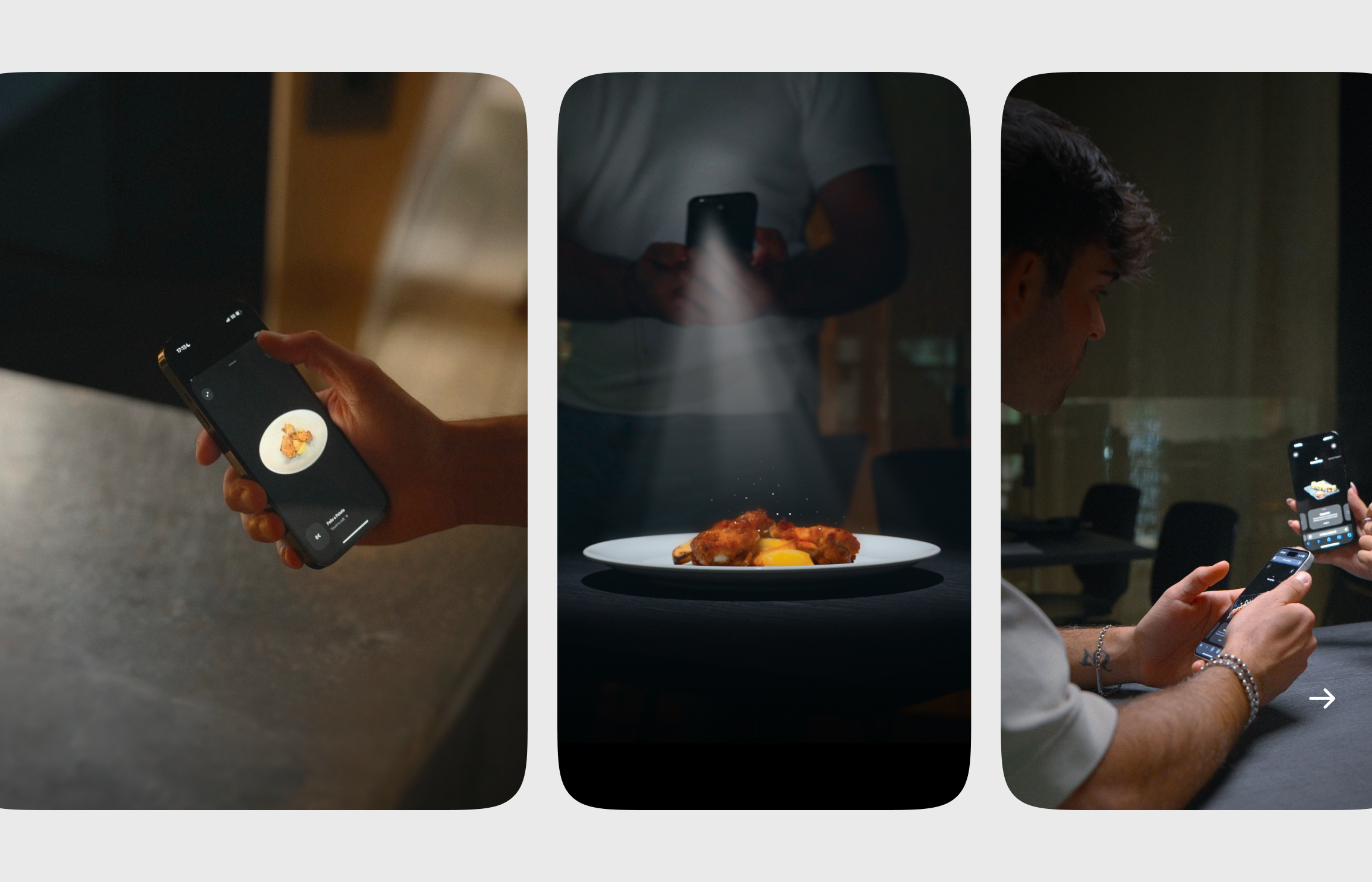
Shoot, generate and propagate
in under 3 minutes.
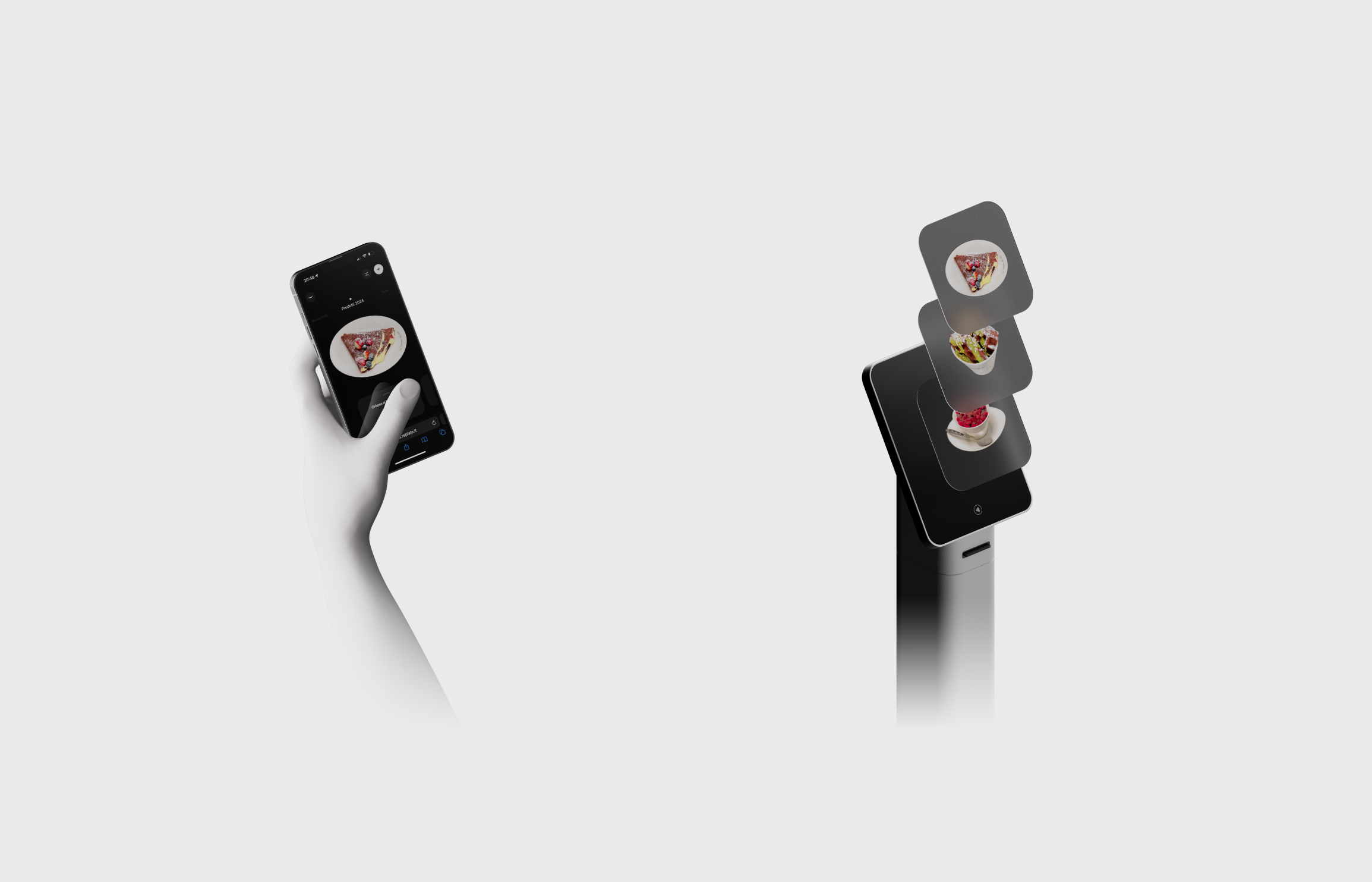
The process to create and connect touchpoints with the new product preview is essential with Replate. User needs to scan the product and forget about everything.

During the discovery phase, I aimed to understand how restaurants make decisions about investing time and money in their digital tools. Many owners expressed that their budgets are tightly allocated toward essentials — ingredients, staff, and customer experience — leaving little room for complex or high-maintenance digital solutions.
They are willing to invest in tools that save time, reduce operational costs, and can be managed without technical skills, but they avoid platforms that require constant updates, long onboarding, or recurring design expenses.
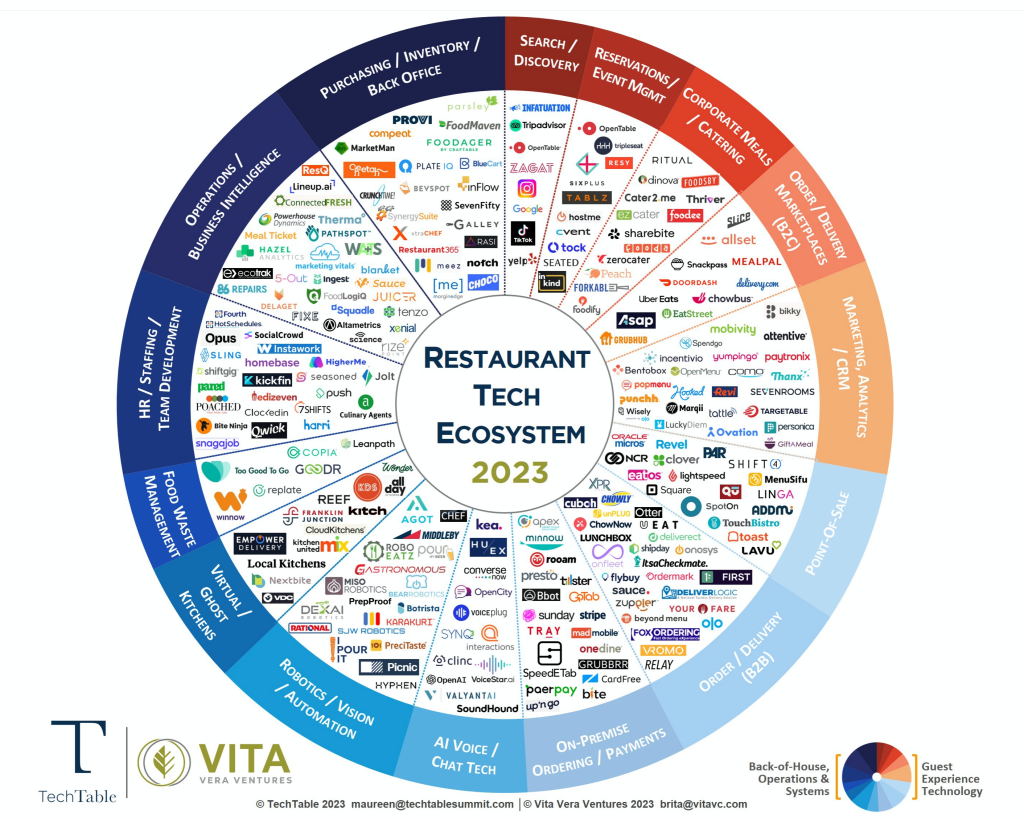
White space opportunity
Methods
- Interviews with 8 restaurant owners and 5 marketing managers.
- Competitive benchmarking (MenuAR, Sketchfab menus, Matterport).
- Observational research in 3 pilot restaurants.
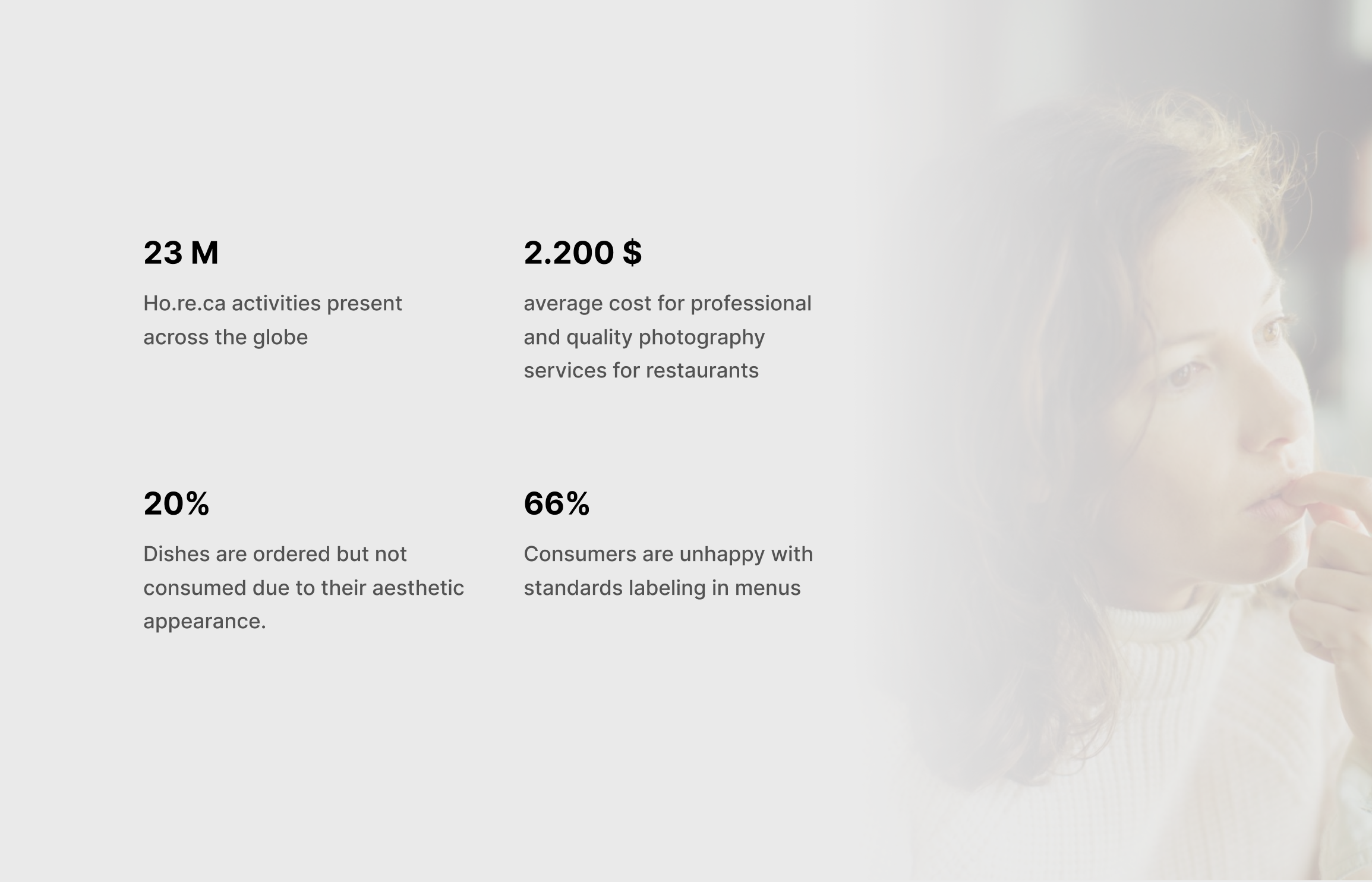
User Interviews
Throughout the research phase, I interviewed 10 restaurant owners and managers to understand how they currently handle menu updates, food presentation, and customer engagement across digital touchpoints.
💡 Highlight
- 80% of participants reported they rely on photographers or agencies for menu visuals, leading to high recurring costs.
- Most restaurants only update visuals seasonally or less, due to the time and coordination required.
- The main deterrents to adopting new digital tools were complex setup and lack of internal technical skills.
- Fast updates and visual consistency across delivery platforms, websites, and in-store displays were identified as top priorities.
- Several participants expressed frustration over not being able to preview menu visuals before publishing, resulting in inconsistent branding.
"Restaurant owners don’t want another complex tool — they just want to update their menus quickly, keep them beautiful, and get back to running their business."
Prioritization Matrix
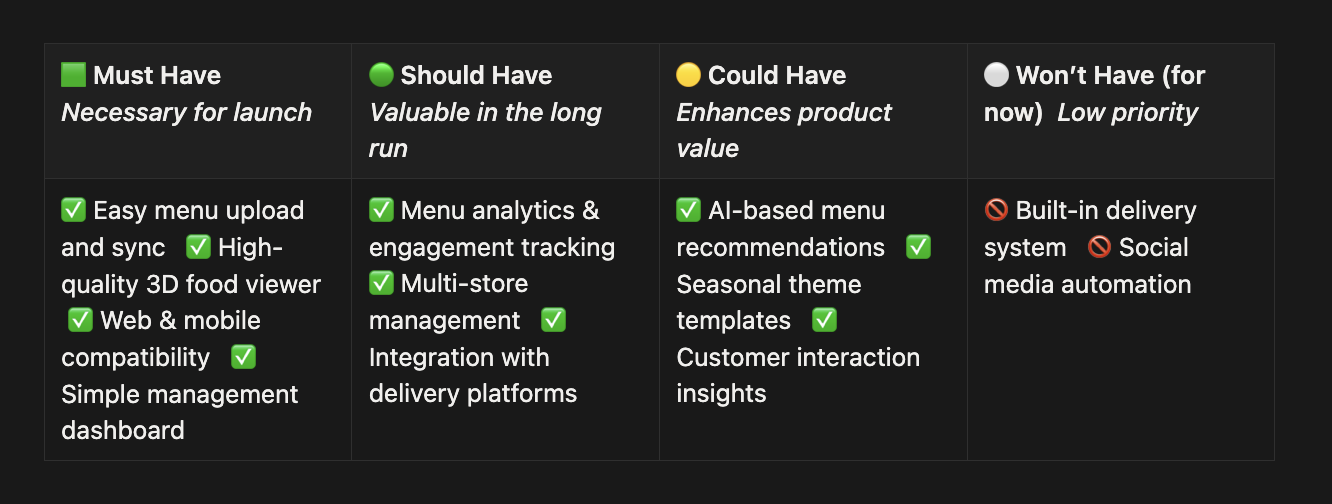
I organized restaurant needs using a 2×2 prioritization matrix to define which features are essential for the MVP and which can be developed later.
Research Synthesis
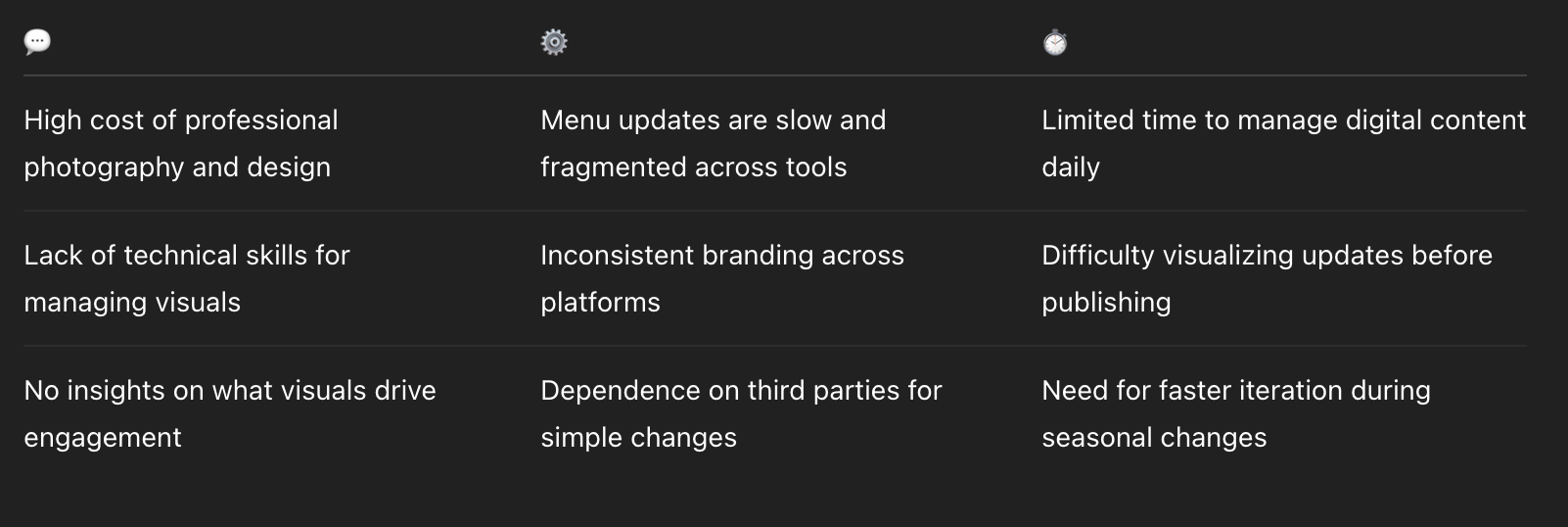
After completing user interviews and market analysis, I synthesized the findings to identify key pain points that restaurant owners and managers face when managing menus and digital content.
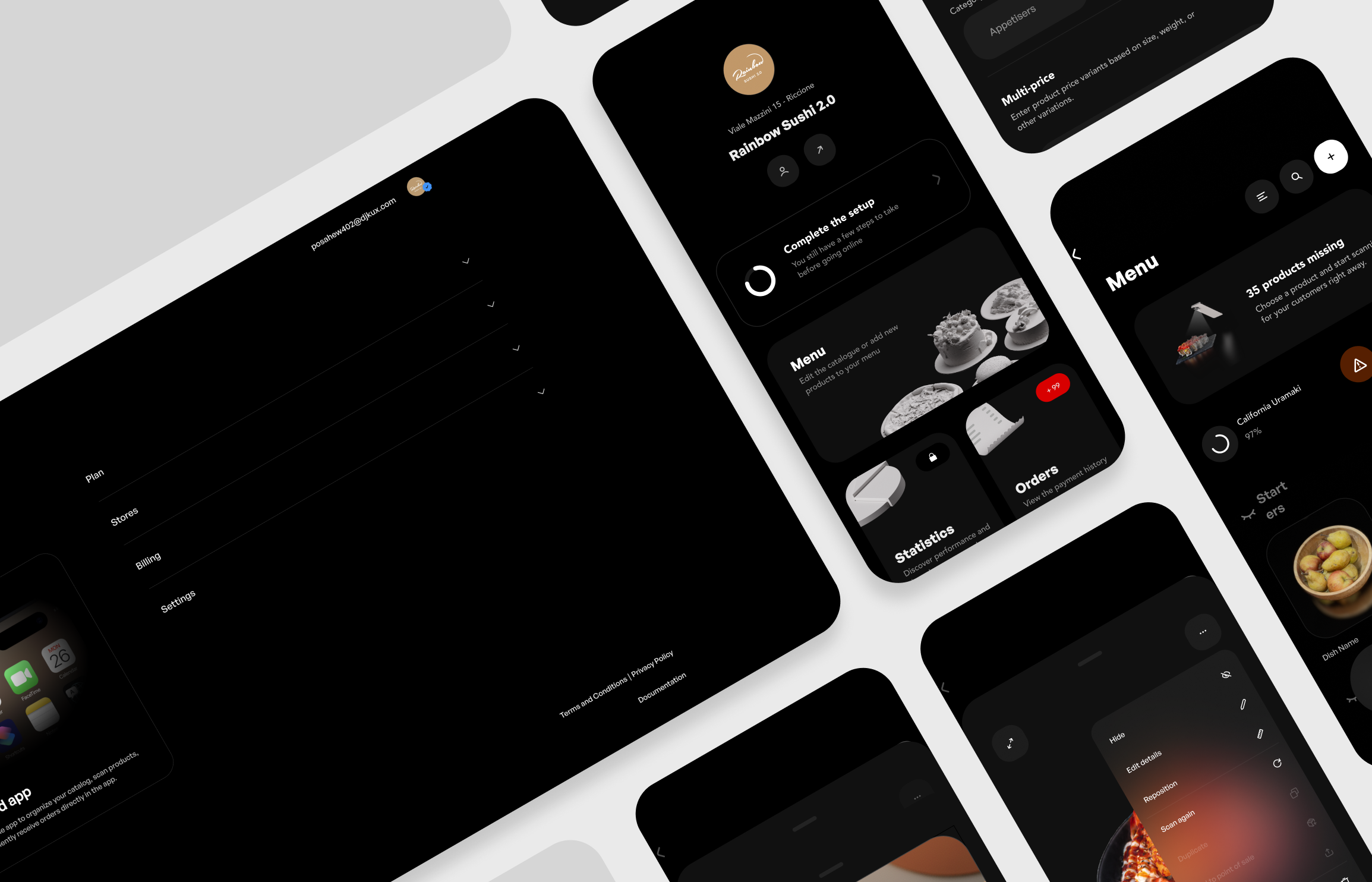
Wireframes & Early Concepts
Goals
- Prioritize quick upload and instant feedback.
- Maintain visual consistency between Web and Mobile.
- Use card layouts for clear dish overviews.


Core User Flows
- Restaurant Owner → Create scans, manage prices, publish menus.
- Marketing Manager → Track performance and engagement.
- Customer → Interact with 3D dishes through the web or AR view.
Highlighted Features
- 3D Scan Upload: Capture dishes using the mobile app and auto-process in the cloud.
- Model Sync: Real-time synchronization between mobile and web dashboard.
- Analytics Dashboard: Visualize dish engagement, impressions, and interactions.
- Menu Builder: Combine 3D scans with descriptions, categories, and pricing.
- AR Viewer: Allow customers to visualize dishes in real size directly on their table.
Usability Testing & Iterations
Testing Process
- Conducted usability tests with 6 pilot users.
- Observed confusion around technical language and upload progress visibility.
Key Learnings
- Changed “mesh” → “3D scan” to make terminology accessible.
- Simplified upload process into a single, visible progress step.
- Added a “Preview before publish” step for reassurance.
How might we enable restaurants to easily create and manage realistic 3D representations of their dishes, without requiring technical expertise?
Main Objectives
- Simplify 3D scan management for non-technical users.
- Centralize synchronization between mobile app and web dashboard.
Success Metrics
- Reduce menu update time from days to minutes.
- Achieve 1-click sync between mobile and web.
Solution
Shoot, generate and propagate
in under 3 minutes.
The process to create and connect touchpoints with the new product preview is essential with Replate. User needs to scan the product and forget about everything.
During the discovery phase, I aimed to understand how restaurants make decisions about investing time and money in their digital tools. Many owners expressed that their budgets are tightly allocated toward essentials — ingredients, staff, and customer experience — leaving little room for complex or high-maintenance digital solutions.
They are willing to invest in tools that save time, reduce operational costs, and can be managed without technical skills, but they avoid platforms that require constant updates, long onboarding, or recurring design expenses.
White space opportunity
Methods
- Interviews with 8 restaurant owners and 5 marketing managers.
- Competitive benchmarking (MenuAR, Sketchfab menus, Matterport).
- Observational research in 3 pilot restaurants.
User Interviews
Throughout the research phase, I interviewed 10 restaurant owners and managers to understand how they currently handle menu updates, food presentation, and customer engagement across digital touchpoints.
💡 Highlight
- 80% of participants reported they rely on photographers or agencies for menu visuals, leading to high recurring costs.
- Most restaurants only update visuals seasonally or less, due to the time and coordination required.
- The main deterrents to adopting new digital tools were complex setup and lack of internal technical skills.
- Fast updates and visual consistency across delivery platforms, websites, and in-store displays were identified as top priorities.
- Several participants expressed frustration over not being able to preview menu visuals before publishing, resulting in inconsistent branding.
"Restaurant owners don’t want another complex tool — they just want to update their menus quickly, keep them beautiful, and get back to running their business."
Prioritization Matrix
I organized restaurant needs using a 2×2 prioritization matrix to define which features are essential for the MVP and which can be developed later.
Research Synthesis
After completing user interviews and market analysis, I synthesized the findings to identify key pain points that restaurant owners and managers face when managing menus and digital content.
Wireframes & Early Concepts
Goals
- Prioritize quick upload and instant feedback.
- Maintain visual consistency between Web and Mobile.
- Use card layouts for clear dish overviews.
Core User Flows
- Restaurant Owner → Create scans, manage prices, publish menus.
- Marketing Manager → Track performance and engagement.
- Customer → Interact with 3D dishes through the web or AR view.
Highlighted Features
- 3D Scan Upload: Capture dishes using the mobile app and auto-process in the cloud.
- Model Sync: Real-time synchronization between mobile and web dashboard.
- Analytics Dashboard: Visualize dish engagement, impressions, and interactions.
- Menu Builder: Combine 3D scans with descriptions, categories, and pricing.
- AR Viewer: Allow customers to visualize dishes in real size directly on their table.
Usability Testing & Iterations
Testing Process
- Conducted usability tests with 6 pilot users.
- Observed confusion around technical language and upload progress visibility.
Key Learnings
- Changed “mesh” → “3D scan” to make terminology accessible.
- Simplified upload process into a single, visible progress step.
- Added a “Preview before publish” step for reassurance.
How might we enable restaurants to easily create and manage realistic 3D representations of their dishes, without requiring technical expertise?
Main Objectives
- Simplify 3D scan management for non-technical users.
- Centralize synchronization between mobile app and web dashboard.
Success Metrics
- Reduce menu update time from days to minutes.
- Achieve 1-click sync between mobile and web.
What I Learned
#1. Simplicity wins
Talking with restaurant owners showed that most digital tools fail because they demand too much time or technical skill. Keeping the setup and workflow simple became a core design principle.
#2. Visuals drive decisions
Restaurant managers consistently prioritize visuals over text — beautiful, realistic presentations are what convince customers to order. I learned that design quality directly impacts conversion.
#3. Test early, test real
Early feedback from pilot restaurants helped refine the flow for uploading and syncing menus. Testing with real data proved more valuable than internal reviews, revealing usability gaps fast.
Next Steps
#1. Integrate analytics insights
Next, I plan to connect visual performance data — such as which dishes get the most views or interactions — to help restaurants make smarter menu decisions.
#2. Expand multi-store management
Large restaurant groups need a unified system to update multiple menus at once. Extending Replate’s sync logic to multi-location operations is the next big milestone.
Solution
Shoot, generate and propagate
in under 3 minutes.
The process to create and connect touchpoints with the new product preview is essential with Replate. User needs to scan the product and forget about everything.
During the discovery phase, I aimed to understand how restaurants make decisions about investing time and money in their digital tools. Many owners expressed that their budgets are tightly allocated toward essentials — ingredients, staff, and customer experience — leaving little room for complex or high-maintenance digital solutions.
They are willing to invest in tools that save time, reduce operational costs, and can be managed without technical skills, but they avoid platforms that require constant updates, long onboarding, or recurring design expenses.
White space opportunity
Methods
- Interviews with 8 restaurant owners and 5 marketing managers.
- Competitive benchmarking (MenuAR, Sketchfab menus, Matterport).
- Observational research in 3 pilot restaurants.
User Interviews
Throughout the research phase, I interviewed 10 restaurant owners and managers to understand how they currently handle menu updates, food presentation, and customer engagement across digital touchpoints.
💡 Highlight
- 80% of participants reported they rely on photographers or agencies for menu visuals, leading to high recurring costs.
- Most restaurants only update visuals seasonally or less, due to the time and coordination required.
- The main deterrents to adopting new digital tools were complex setup and lack of internal technical skills.
- Fast updates and visual consistency across delivery platforms, websites, and in-store displays were identified as top priorities.
- Several participants expressed frustration over not being able to preview menu visuals before publishing, resulting in inconsistent branding.
"Restaurant owners don’t want another complex tool — they just want to update their menus quickly, keep them beautiful, and get back to running their business."
Prioritization Matrix
I organized restaurant needs using a 2×2 prioritization matrix to define which features are essential for the MVP and which can be developed later.
Research Synthesis
After completing user interviews and market analysis, I synthesized the findings to identify key pain points that restaurant owners and managers face when managing menus and digital content.
Wireframes & Early Concepts
Goals
- Prioritize quick upload and instant feedback.
- Maintain visual consistency between Web and Mobile.
- Use card layouts for clear dish overviews.
Core User Flows
- Restaurant Owner → Create scans, manage prices, publish menus.
- Marketing Manager → Track performance and engagement.
- Customer → Interact with 3D dishes through the web or AR view.
Highlighted Features
- 3D Scan Upload: Capture dishes using the mobile app and auto-process in the cloud.
- Model Sync: Real-time synchronization between mobile and web dashboard.
- Analytics Dashboard: Visualize dish engagement, impressions, and interactions.
- Menu Builder: Combine 3D scans with descriptions, categories, and pricing.
- AR Viewer: Allow customers to visualize dishes in real size directly on their table.
Usability Testing & Iterations
Testing Process
- Conducted usability tests with 6 pilot users.
- Observed confusion around technical language and upload progress visibility.
Key Learnings
- Changed “mesh” → “3D scan” to make terminology accessible.
- Simplified upload process into a single, visible progress step.
- Added a “Preview before publish” step for reassurance.
How might we enable restaurants to easily create and manage realistic 3D representations of their dishes, without requiring technical expertise?
Main Objectives
- Simplify 3D scan management for non-technical users.
- Centralize synchronization between mobile app and web dashboard.
Success Metrics
- Reduce menu update time from days to minutes.
- Achieve 1-click sync between mobile and web.