Redesigning Tesla's interface for drivers who grew up with physical controls
A concept using progressive disclosure and haptic feedback to reduce in-car cognitive load.

At-A-Glance
The Boomer Mode navigation interface was inspired by my experience with the Tesla Model Y. While excited to finally drive my dream car, I realized how complex the onboard interface could be, especially for less tech-savvy users like my parents.
If I, as a digital native, find accessing certain features challenging, how could someone with minimal software knowledge feel comfortable using it? This led me to critically analyze Tesla’s interface and design a more inclusive solution: Boomer Mode.
This project focuses on simplifying the experience for all users, ensuring that anyone, regardless of their technical background, can fully enjoy the vehicle's capabilities.
What I mean with Boomer?
By "Boomer," I simply refer to an age group, typically those born between the late 1940s and the 1960s. In this context, the Boomer is considered a basic technology user, someone who can handle smartphones for calls, messages, and simple apps but may struggle with more complex or advanced interfaces.
Background
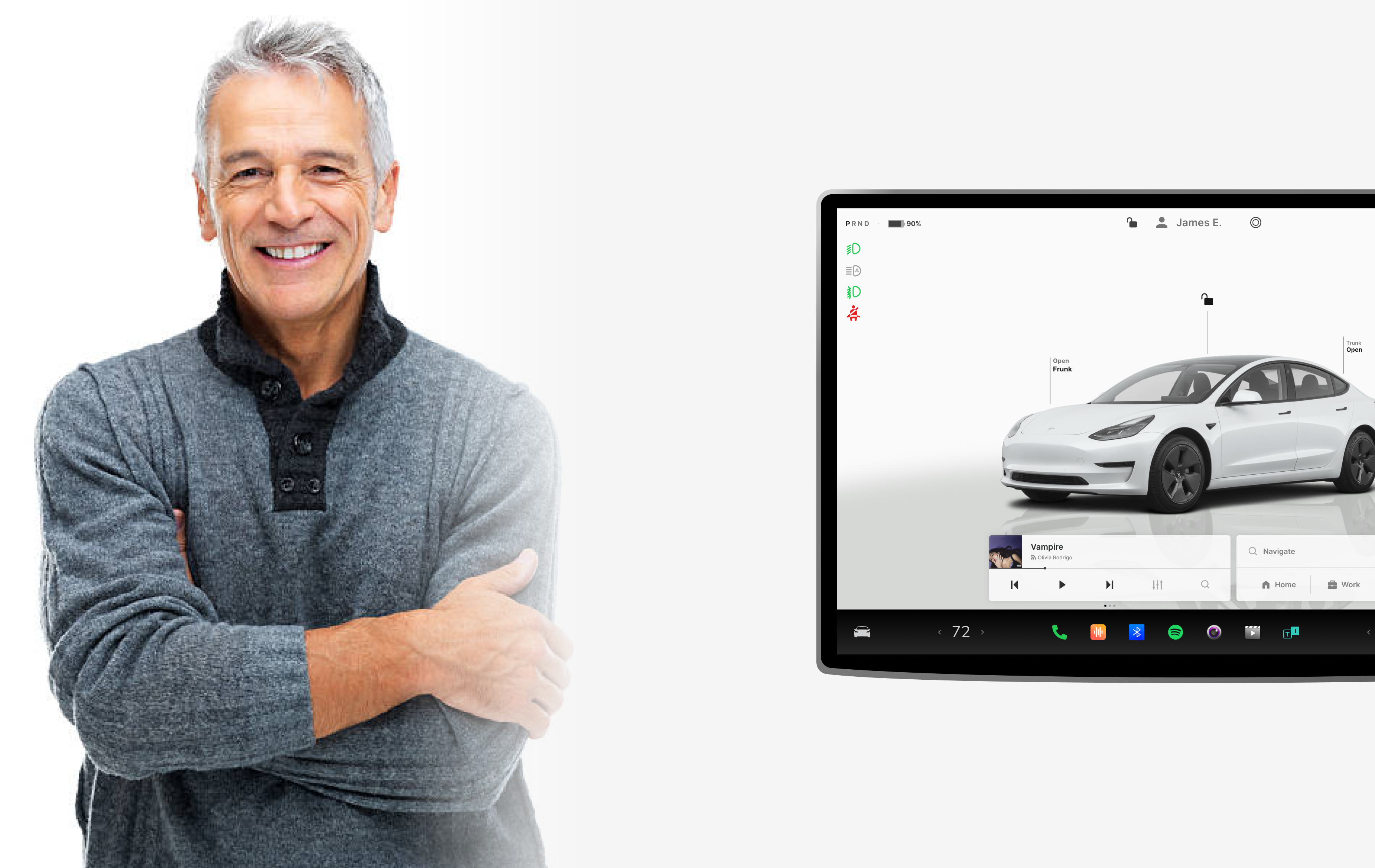
James has been driving for over 40 years and recently decided to switch to an electric vehicle to embrace sustainability and save on fuel costs. While he’s excited about the advanced features of his new car, he feels overwhelmed by its complex interface and touchscreen-driven controls.
Motivations
- Eco-conscious: Wants to contribute to reducing environmental impact.
- Cost-saving: Excited about saving money on fuel and maintenance.
- Convenience: Prefers straightforward, reliable systems.
Frustrations
- Complexity: Finds it challenging to locate and activate basic features like climate control and navigation.
- Touchscreen Dependency: Misses physical buttons and knobs that provide immediate feedback.
- Learning Curve: Struggles with the time required to learn the intricacies of the onboard software.
Goals
- To feel confident and comfortable using the car's features without needing constant reference to the manual.
- To navigate and control the car with minimal effort, especially while driving.
- To enjoy the benefits of electric driving without technical barriers.
Needs
- A simplified interface with clearly labeled, easy-to-access functions.
- Physical or haptic feedback for key controls to improve usability.
- Progressive disclosure to reduce cognitive overload by showing only essential options upfront.
What boomer have seen in their experience?
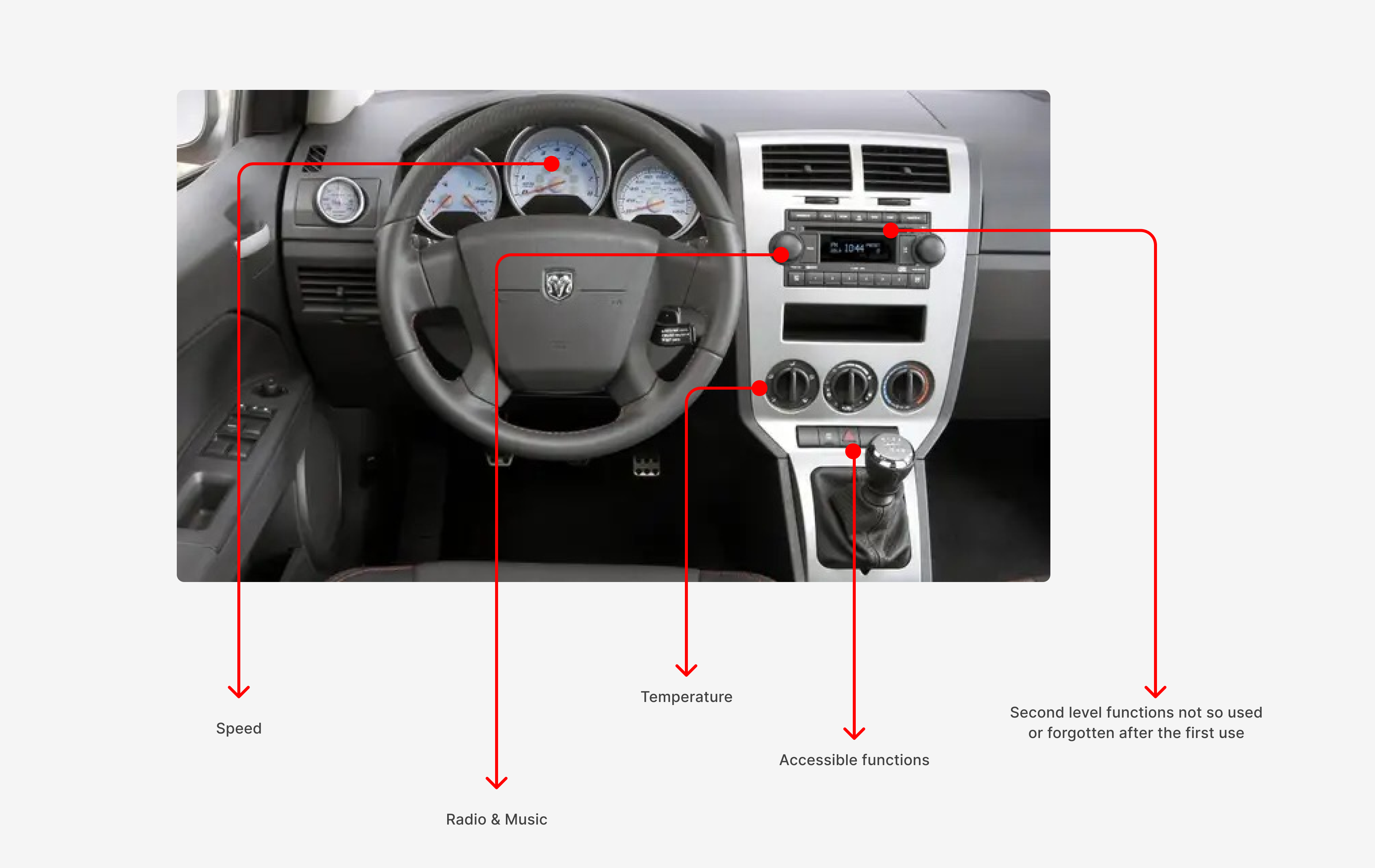
Boomers grew up with cars where every function had a physical control—knobs, dials, and levers that were simple, tactile, and intuitive. These straightforward designs provided immediate feedback, shaping their expectations for ease of use and making modern, touchscreen-driven interfaces feel less approachable.
Haptic feedback commands to enhance interaction
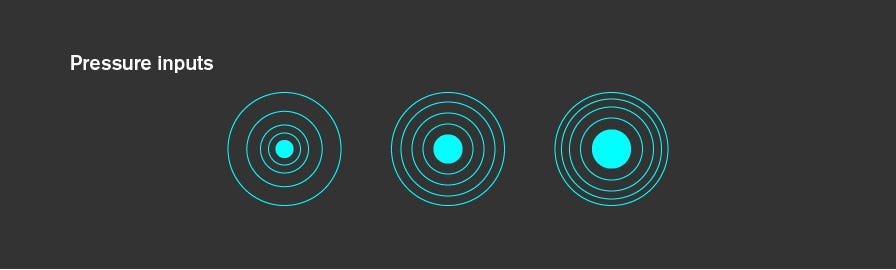
Haptic feedback adds a tactile dimension to digital commands, offering vibrations or resistance to mimic the feel of physical controls. This design improves accessibility and intuitiveness, especially for Boomer users, by bridging the gap between modern interfaces and the tangible experiences they are familiar with.
Simplified options and organizatios
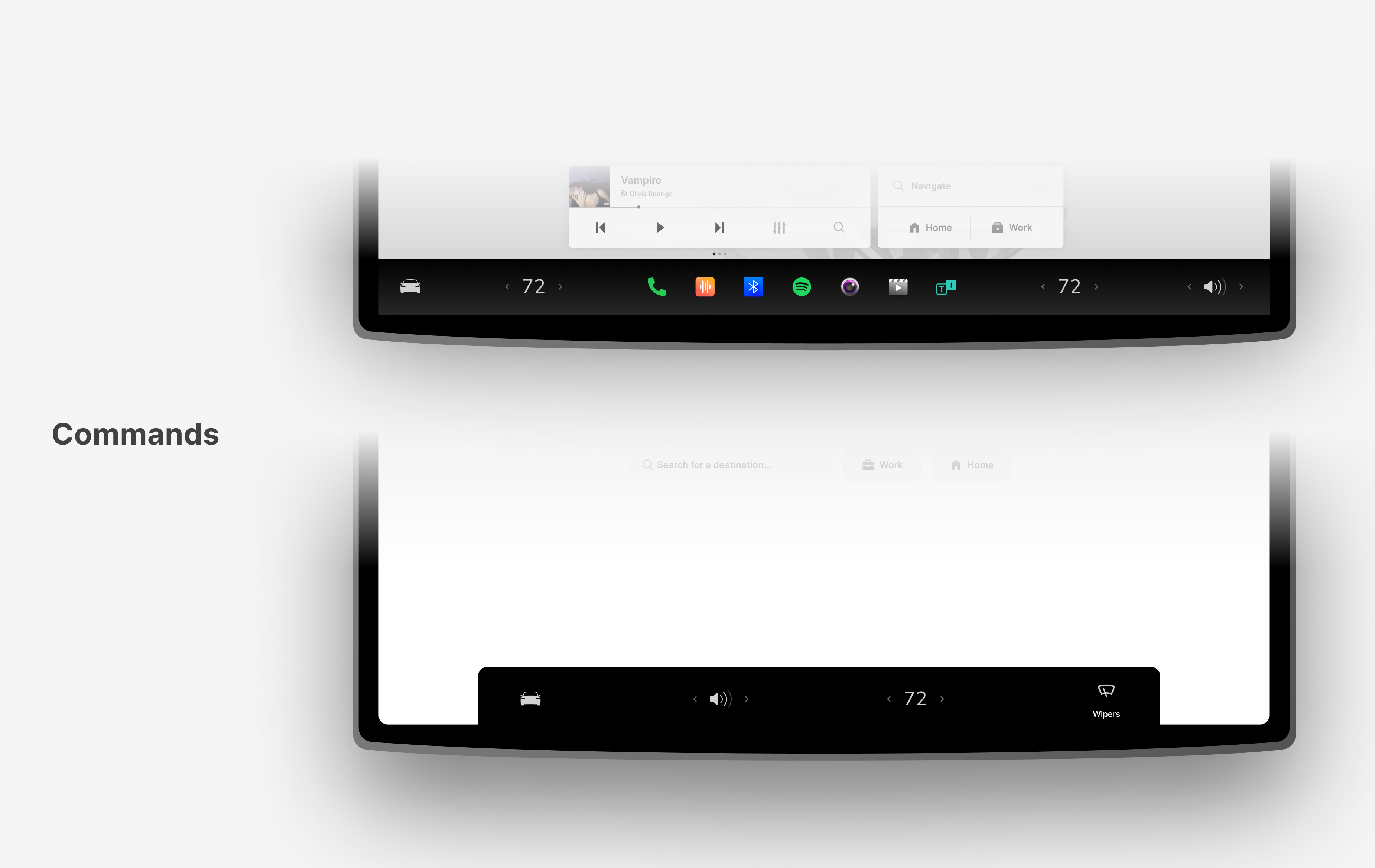
Reducing choice options and organizing controls more intuitively streamlines user interactions. This approach minimizes cognitive load, enhances usability, and creates a cleaner, more focused interface for a better overall experience.
Simplify first, discover more with progressive disclosure
Designing intuitive controls with simple gestures enhances usability. A single tap opens the music player for quick access, while a long press mutes the current stream, providing a seamless and efficient user experience with minimal effort.
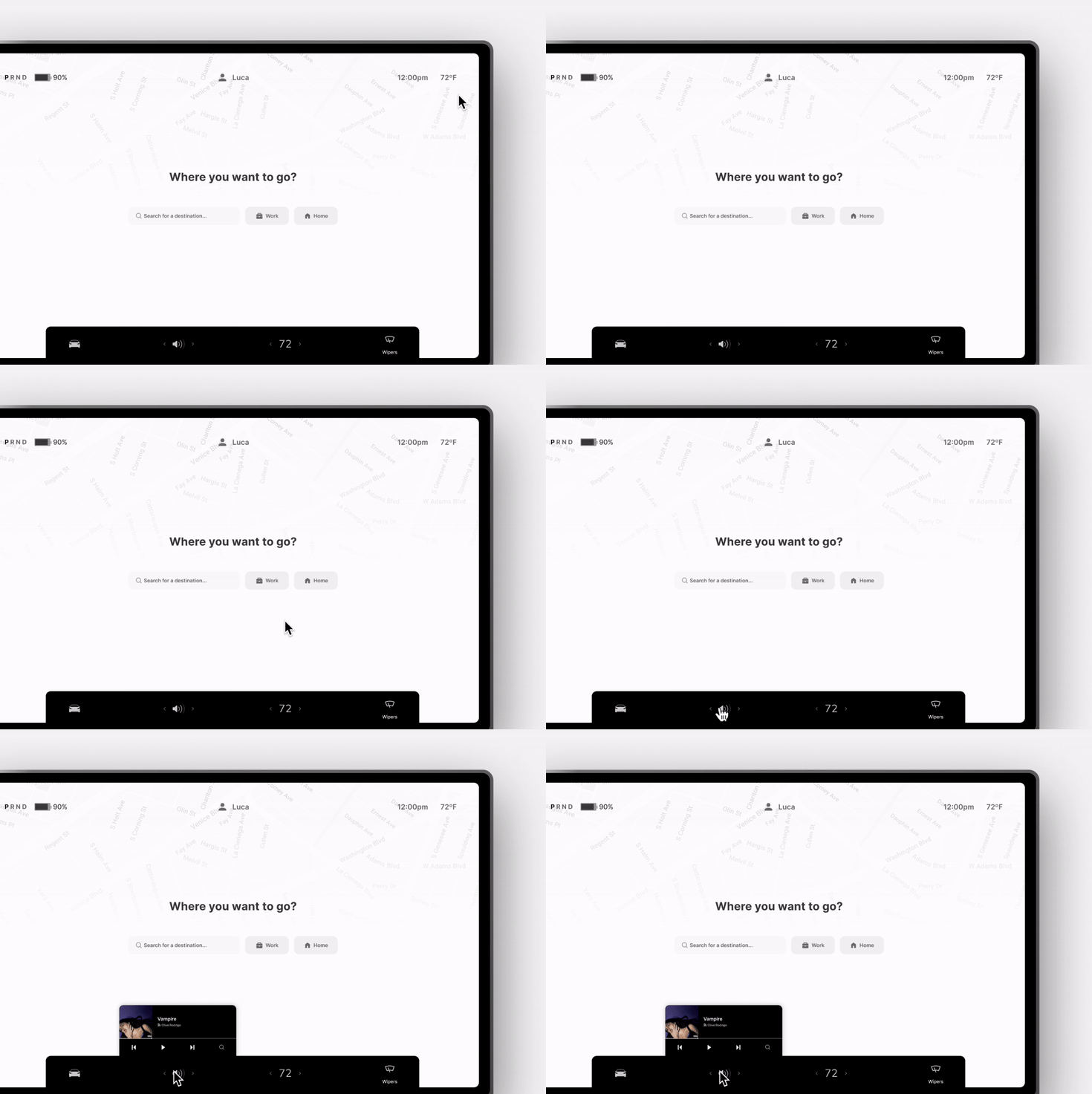
Long Press - Mute Streaming
Navigation with Boomer Mode
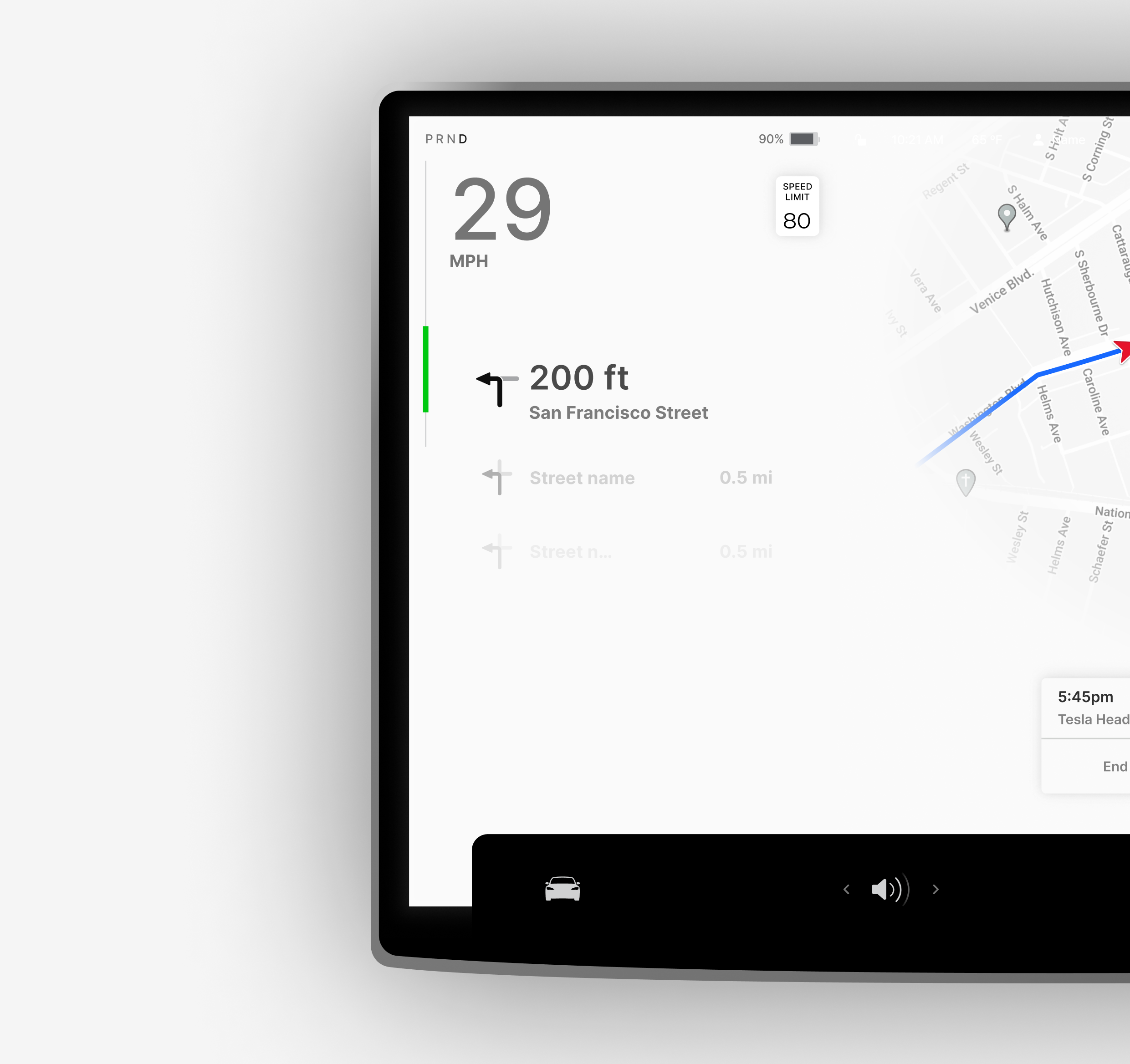
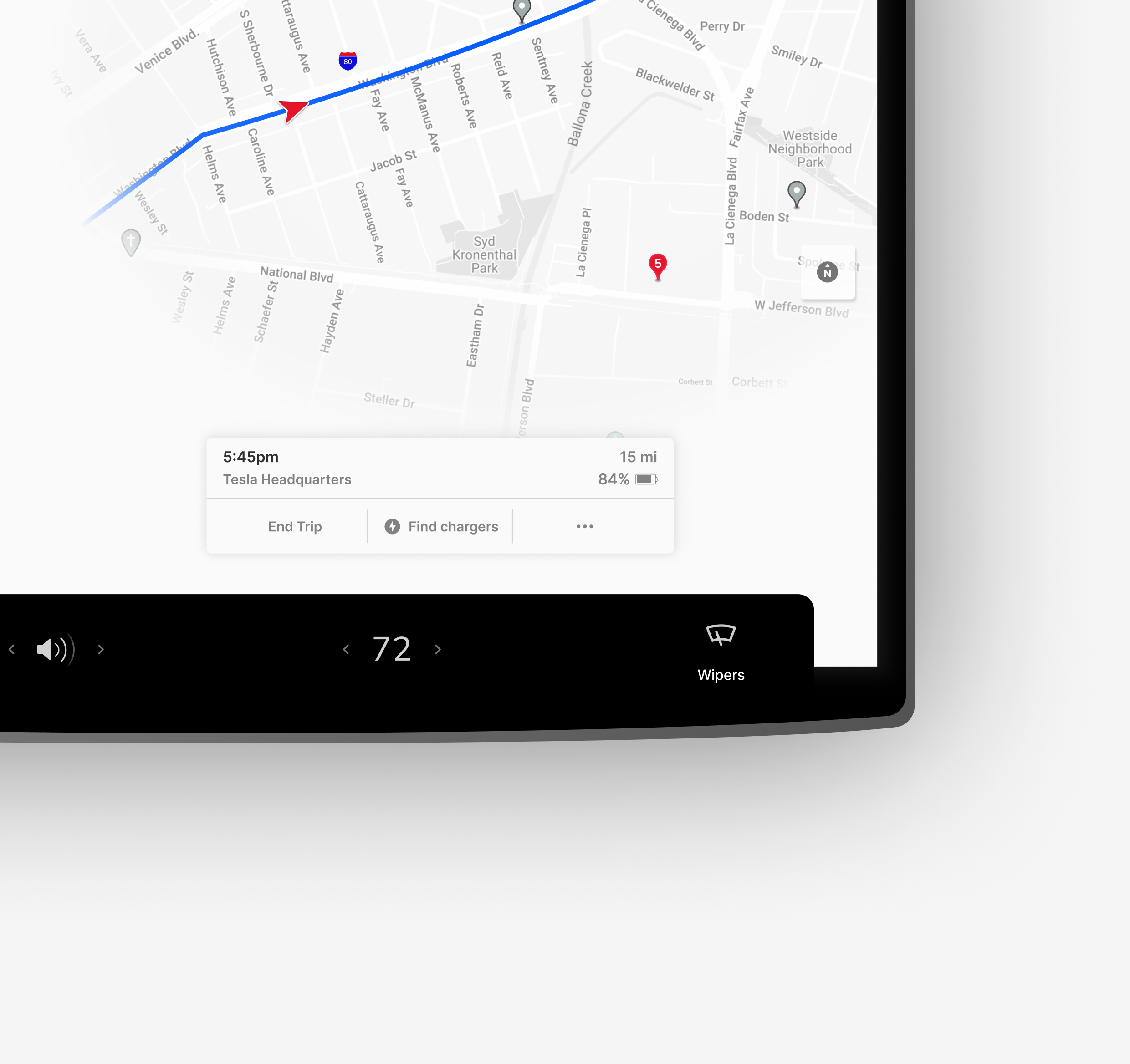
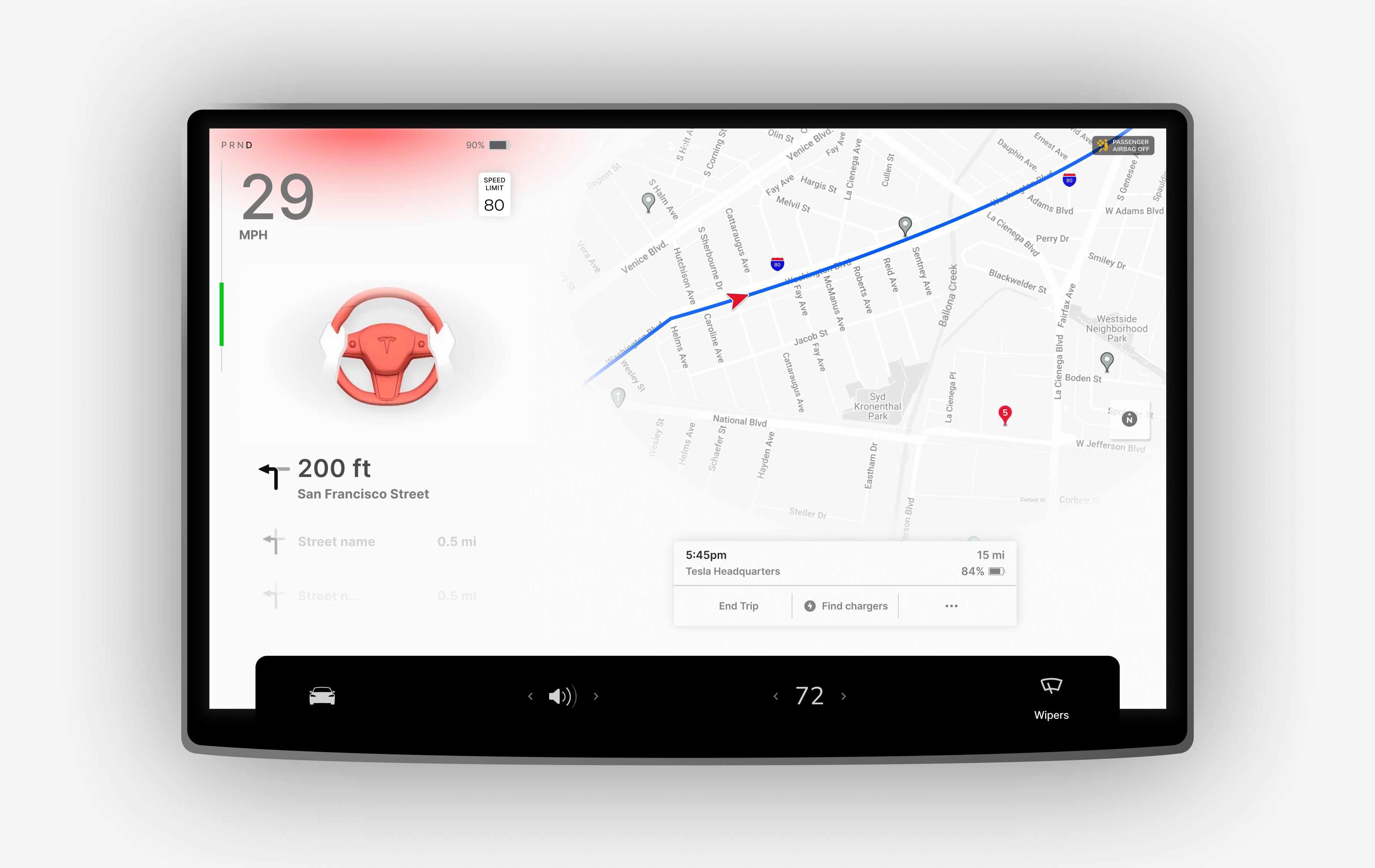
Boomer Mode simplifies navigation by reducing visual clutter, focusing only on essential elements. By minimizing distractions, this design allows drivers to quickly locate critical information, enhancing safety and usability.
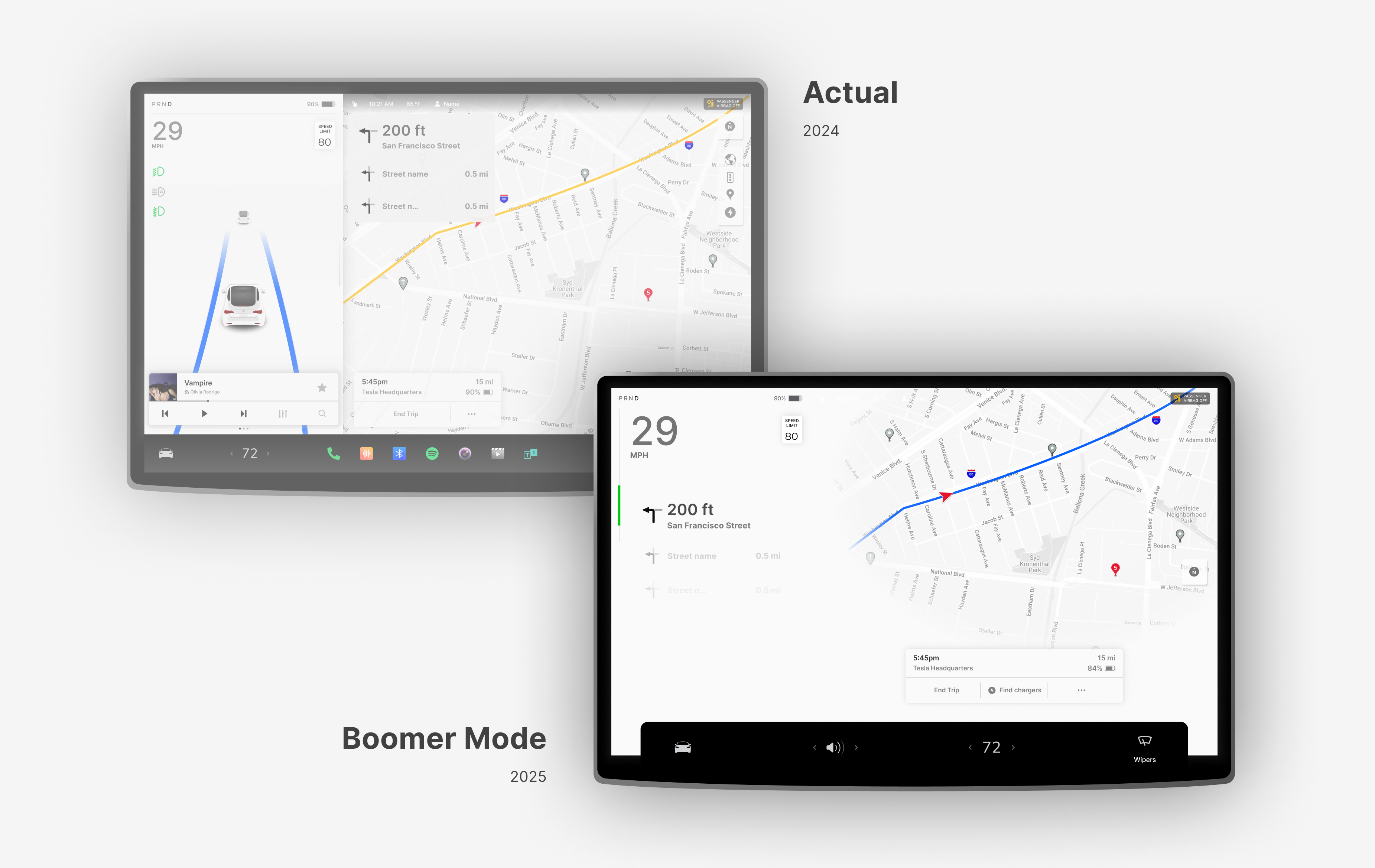
Enable the Boomer Mode
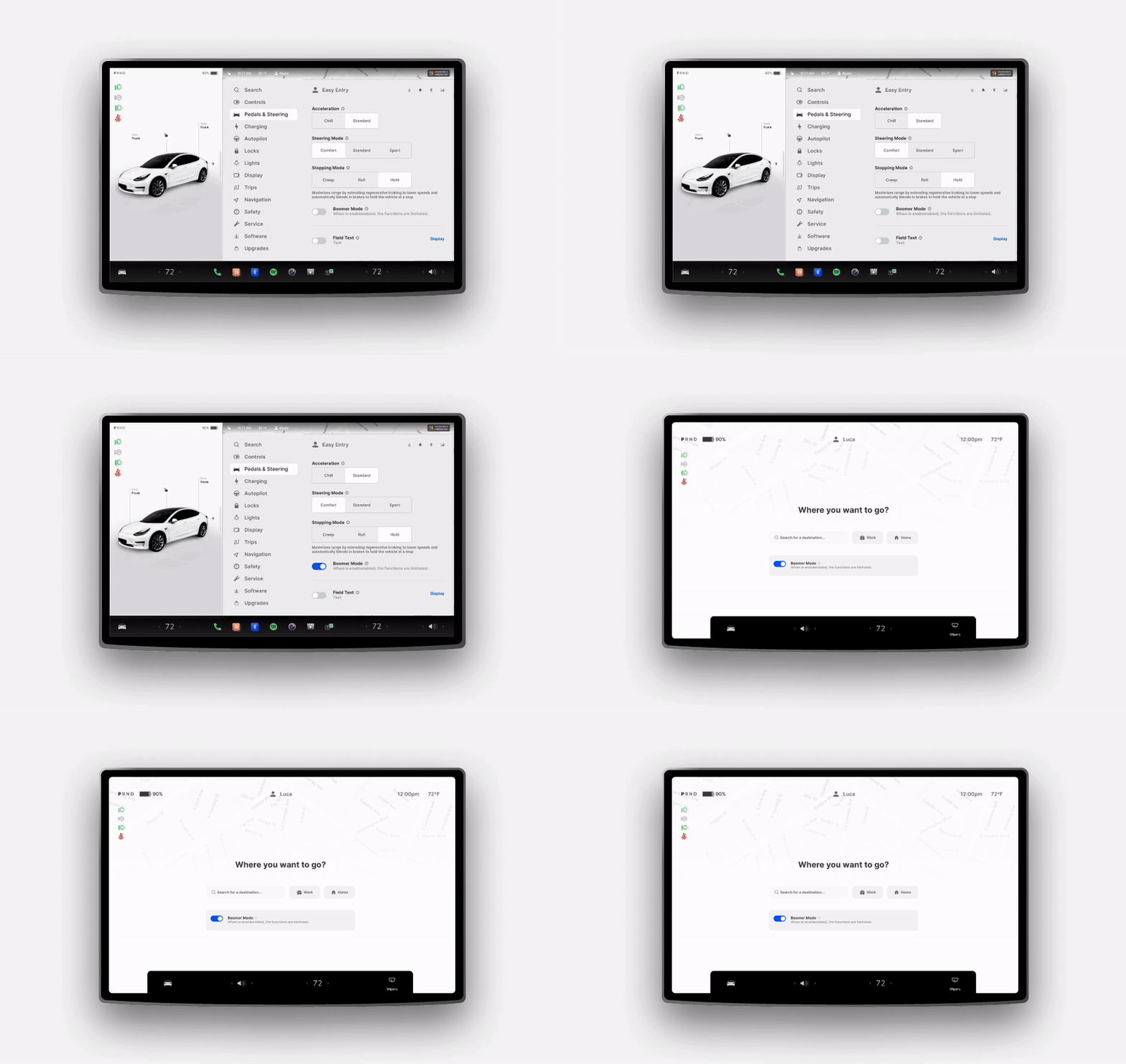
Enable Boomer Mode
Boomer Mode can be activated in two simple ways:
- Custom Driver Profile: Save it as a dedicated profile for a specific driver, such as a parent or someone who prefers simplified controls. This allows the car to automatically switch to Boomer Mode when their profile is selected.
- Settings Menu: Navigate to the car’s settings and manually enable Boomer Mode for quick access.
This flexibility ensures that Boomer Mode is easy to set up and tailor to the needs of non-expert drivers.
Vocal commands to control everything in the car
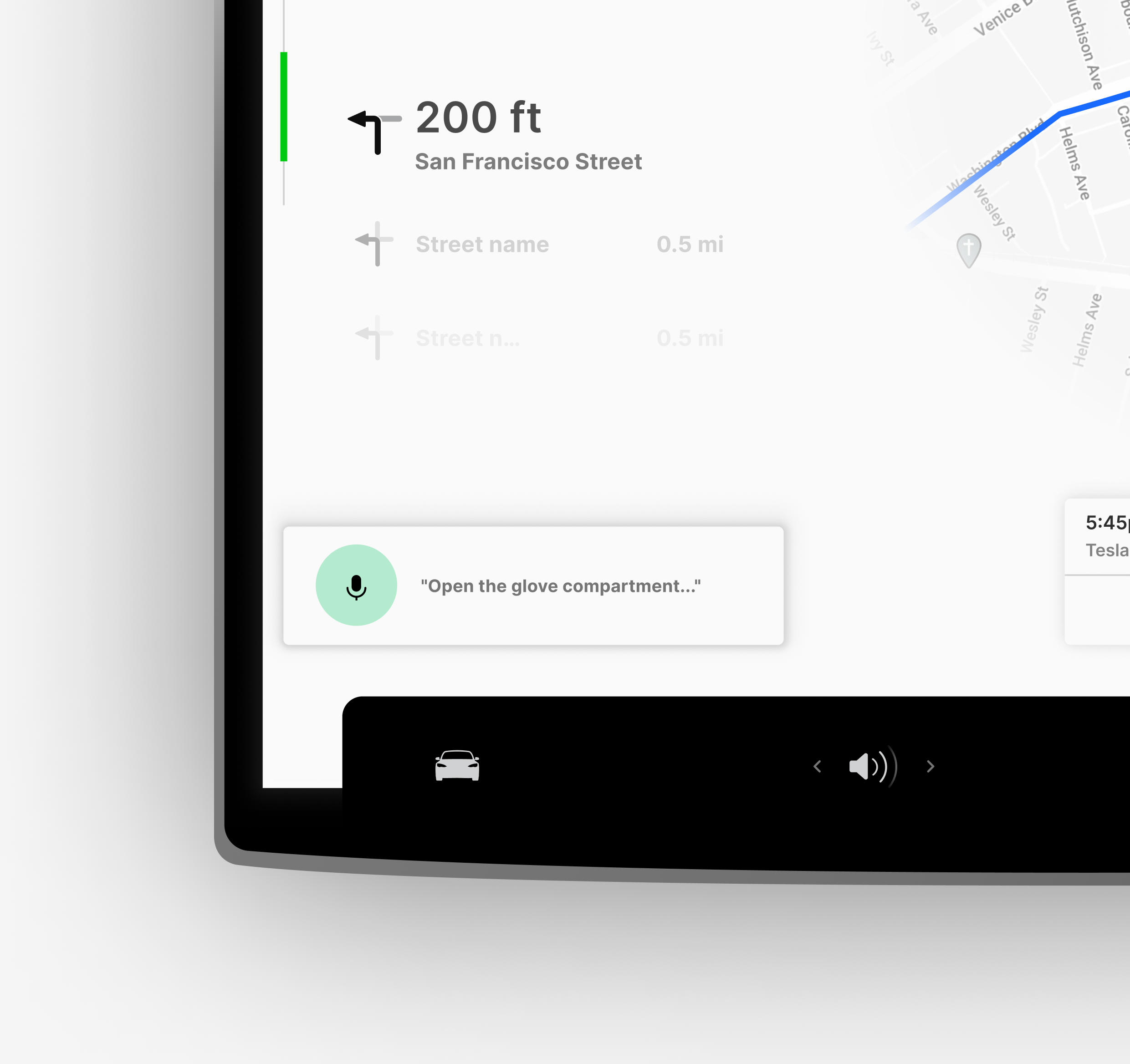
Vocal commands provide a hands-free, intuitive way to interact with the car, enhancing safety and convenience during driving. By simply asking the car to perform tasks—such as adjusting climate settings, opening the navigation, or managing media—drivers can stay focused on the road without the distraction of navigating menus or touchscreens.
Integrating an AI assistant like ChatGPT elevates this experience further by enabling complex interactions, such as:
- Agenda and Calendar Management: Asking the car to check your schedule or set reminders.
- Information Lookup: Searching online for directions, traffic updates, or other relevant details during the drive.
- Enhanced Personalization: Tailored responses and recommendations based on user preferences or context.
This seamless integration not only improves accessibility for all users but also transforms the car into a smart, connected assistant, making driving safer and more efficient.
What I mean with Boomer?
By "Boomer," I simply refer to an age group, typically those born between the late 1940s and the 1960s. In this context, the Boomer is considered a basic technology user, someone who can handle smartphones for calls, messages, and simple apps but may struggle with more complex or advanced interfaces.
Background
James has been driving for over 40 years and recently decided to switch to an electric vehicle to embrace sustainability and save on fuel costs. While he’s excited about the advanced features of his new car, he feels overwhelmed by its complex interface and touchscreen-driven controls.
Motivations
- Eco-conscious: Wants to contribute to reducing environmental impact.
- Cost-saving: Excited about saving money on fuel and maintenance.
- Convenience: Prefers straightforward, reliable systems.
Frustrations
- Complexity: Finds it challenging to locate and activate basic features like climate control and navigation.
- Touchscreen Dependency: Misses physical buttons and knobs that provide immediate feedback.
- Learning Curve: Struggles with the time required to learn the intricacies of the onboard software.
Goals
- To feel confident and comfortable using the car's features without needing constant reference to the manual.
- To navigate and control the car with minimal effort, especially while driving.
- To enjoy the benefits of electric driving without technical barriers.
Needs
- A simplified interface with clearly labeled, easy-to-access functions.
- Physical or haptic feedback for key controls to improve usability.
- Progressive disclosure to reduce cognitive overload by showing only essential options upfront.
What boomer have seen in their experience?
Boomers grew up with cars where every function had a physical control—knobs, dials, and levers that were simple, tactile, and intuitive. These straightforward designs provided immediate feedback, shaping their expectations for ease of use and making modern, touchscreen-driven interfaces feel less approachable.
Haptic feedback commands to enhance interaction
Haptic feedback adds a tactile dimension to digital commands, offering vibrations or resistance to mimic the feel of physical controls. This design improves accessibility and intuitiveness, especially for Boomer users, by bridging the gap between modern interfaces and the tangible experiences they are familiar with.
Simplified options and organizatios
Reducing choice options and organizing controls more intuitively streamlines user interactions. This approach minimizes cognitive load, enhances usability, and creates a cleaner, more focused interface for a better overall experience.
Simplify first, discover more with progressive disclosure
Designing intuitive controls with simple gestures enhances usability. A single tap opens the music player for quick access, while a long press mutes the current stream, providing a seamless and efficient user experience with minimal effort.
Long Press - Mute Streaming
Navigation with Boomer Mode
Boomer Mode simplifies navigation by reducing visual clutter, focusing only on essential elements. By minimizing distractions, this design allows drivers to quickly locate critical information, enhancing safety and usability.
Enable the Boomer Mode
Enable Boomer Mode
Boomer Mode can be activated in two simple ways:
- Custom Driver Profile: Save it as a dedicated profile for a specific driver, such as a parent or someone who prefers simplified controls. This allows the car to automatically switch to Boomer Mode when their profile is selected.
- Settings Menu: Navigate to the car’s settings and manually enable Boomer Mode for quick access.
This flexibility ensures that Boomer Mode is easy to set up and tailor to the needs of non-expert drivers.
Vocal commands to control everything in the car
Vocal commands provide a hands-free, intuitive way to interact with the car, enhancing safety and convenience during driving. By simply asking the car to perform tasks—such as adjusting climate settings, opening the navigation, or managing media—drivers can stay focused on the road without the distraction of navigating menus or touchscreens.
Integrating an AI assistant like ChatGPT elevates this experience further by enabling complex interactions, such as:
- Agenda and Calendar Management: Asking the car to check your schedule or set reminders.
- Information Lookup: Searching online for directions, traffic updates, or other relevant details during the drive.
- Enhanced Personalization: Tailored responses and recommendations based on user preferences or context.
This seamless integration not only improves accessibility for all users but also transforms the car into a smart, connected assistant, making driving safer and more efficient.
Boomer Mode: a concept with practical potential
Boomer Mode is currently just a concept, but its potential to simplify the driving experience for non-expert users is significant. By reducing complexity and focusing on essential functions, it addresses usability challenges for those less familiar with advanced vehicle interfaces. This solution could make modern cars more accessible, ensuring that technology enhances rather than hinders the driving experience, especially for older generations or those seeking a more straightforward interaction.
What I mean with Boomer?
By "Boomer," I simply refer to an age group, typically those born between the late 1940s and the 1960s. In this context, the Boomer is considered a basic technology user, someone who can handle smartphones for calls, messages, and simple apps but may struggle with more complex or advanced interfaces.
Background
James has been driving for over 40 years and recently decided to switch to an electric vehicle to embrace sustainability and save on fuel costs. While he’s excited about the advanced features of his new car, he feels overwhelmed by its complex interface and touchscreen-driven controls.
Motivations
- Eco-conscious: Wants to contribute to reducing environmental impact.
- Cost-saving: Excited about saving money on fuel and maintenance.
- Convenience: Prefers straightforward, reliable systems.
Frustrations
- Complexity: Finds it challenging to locate and activate basic features like climate control and navigation.
- Touchscreen Dependency: Misses physical buttons and knobs that provide immediate feedback.
- Learning Curve: Struggles with the time required to learn the intricacies of the onboard software.
Goals
- To feel confident and comfortable using the car's features without needing constant reference to the manual.
- To navigate and control the car with minimal effort, especially while driving.
- To enjoy the benefits of electric driving without technical barriers.
Needs
- A simplified interface with clearly labeled, easy-to-access functions.
- Physical or haptic feedback for key controls to improve usability.
- Progressive disclosure to reduce cognitive overload by showing only essential options upfront.
What boomer have seen in their experience?
Boomers grew up with cars where every function had a physical control—knobs, dials, and levers that were simple, tactile, and intuitive. These straightforward designs provided immediate feedback, shaping their expectations for ease of use and making modern, touchscreen-driven interfaces feel less approachable.
Haptic feedback commands to enhance interaction
Haptic feedback adds a tactile dimension to digital commands, offering vibrations or resistance to mimic the feel of physical controls. This design improves accessibility and intuitiveness, especially for Boomer users, by bridging the gap between modern interfaces and the tangible experiences they are familiar with.
Simplified options and organizatios
Reducing choice options and organizing controls more intuitively streamlines user interactions. This approach minimizes cognitive load, enhances usability, and creates a cleaner, more focused interface for a better overall experience.
Simplify first, discover more with progressive disclosure
Designing intuitive controls with simple gestures enhances usability. A single tap opens the music player for quick access, while a long press mutes the current stream, providing a seamless and efficient user experience with minimal effort.
Long Press - Mute Streaming
Navigation with Boomer Mode
Boomer Mode simplifies navigation by reducing visual clutter, focusing only on essential elements. By minimizing distractions, this design allows drivers to quickly locate critical information, enhancing safety and usability.
Enable the Boomer Mode
Enable Boomer Mode
Boomer Mode can be activated in two simple ways:
- Custom Driver Profile: Save it as a dedicated profile for a specific driver, such as a parent or someone who prefers simplified controls. This allows the car to automatically switch to Boomer Mode when their profile is selected.
- Settings Menu: Navigate to the car’s settings and manually enable Boomer Mode for quick access.
This flexibility ensures that Boomer Mode is easy to set up and tailor to the needs of non-expert drivers.
Vocal commands to control everything in the car
Vocal commands provide a hands-free, intuitive way to interact with the car, enhancing safety and convenience during driving. By simply asking the car to perform tasks—such as adjusting climate settings, opening the navigation, or managing media—drivers can stay focused on the road without the distraction of navigating menus or touchscreens.
Integrating an AI assistant like ChatGPT elevates this experience further by enabling complex interactions, such as:
- Agenda and Calendar Management: Asking the car to check your schedule or set reminders.
- Information Lookup: Searching online for directions, traffic updates, or other relevant details during the drive.
- Enhanced Personalization: Tailored responses and recommendations based on user preferences or context.
This seamless integration not only improves accessibility for all users but also transforms the car into a smart, connected assistant, making driving safer and more efficient.